ANALOGALCHEMY / GUIDES / STEM SEPARATION
Split any song into six stems on your Mac — offline.
GUIDE · UPDATED JUNE 2026 · TAKES ~2 MINUTES PER SONG
Whether you want an instrumental for karaoke, an a-cappella to remix, or just the bass line slowed down so you can finally learn it — stem separation is the tool, and you don't need a web service or a subscription to use it. AnalogAlchemy's Stem Lab runs Demucs — the separation model originally developed at Meta and widely regarded as the open-source benchmark — natively on your Mac. Your audio never leaves your disk.
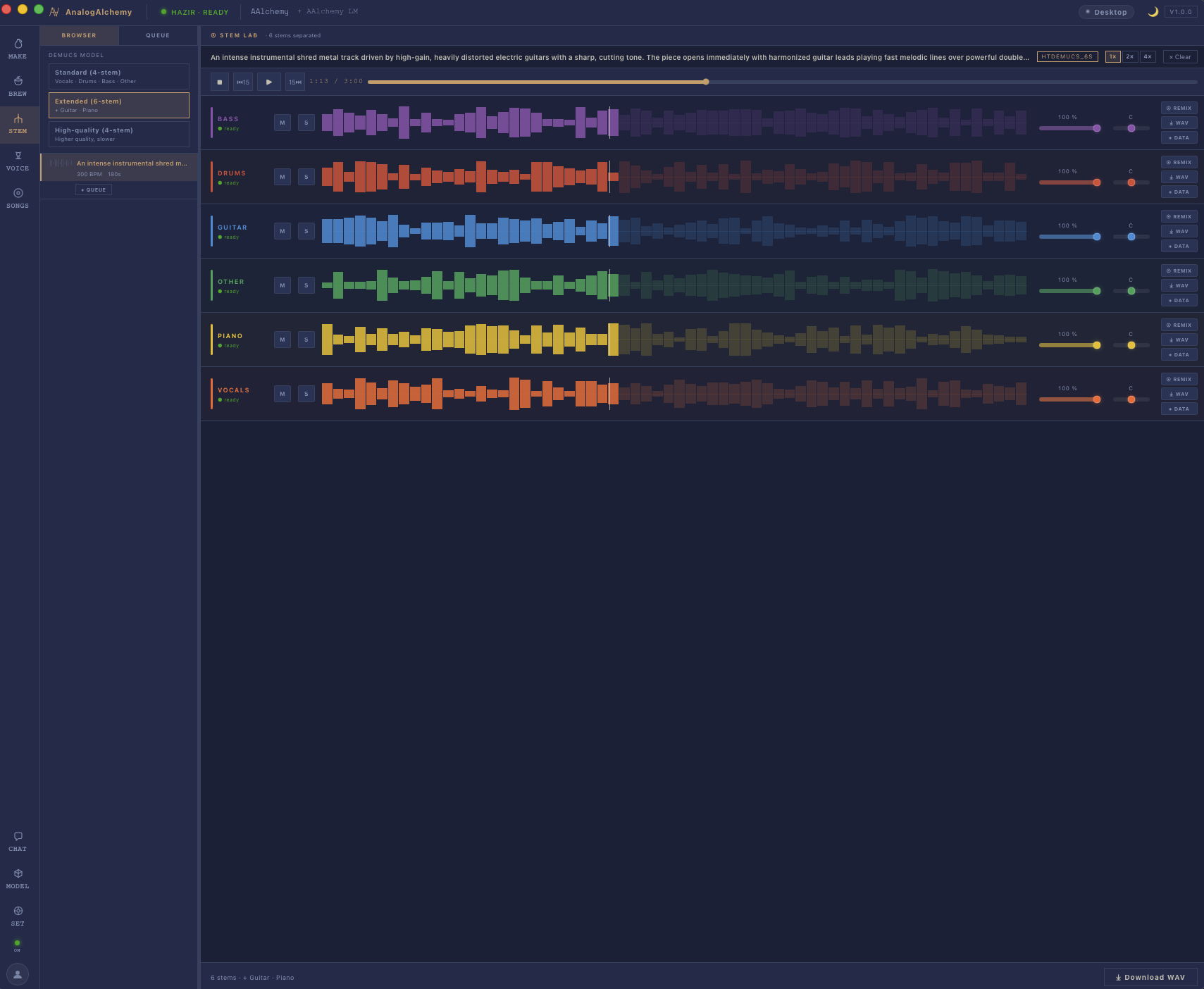
Open the Stem Lab
Launch AnalogAlchemy and pick Stem from the navigation. If this is your first separation, the Demucs model is already part of the app's model bundle — there's nothing extra to install, no Python, no terminal.
STEP 2Drop in any audio file
Drag an MP3, WAV or FLAC anywhere into the lab. It doesn't have to be a song you generated — old demos, rehearsal room recordings, a track you bought. (For music you don't own the rights to, keep the results personal: practice, transcription, karaoke night.)
STEP 3Let it separate
Demucs analyses the full mix and pulls it apart into six color-coded stems: vocals, drums, bass, guitar, piano and other — that last one catches synths, strings and ambience. On Apple Silicon a typical song takes well under a minute. Everything happens on your machine; pull the network cable out mid-separation if you want to check.
STEP 4Mute, solo, export
Each stem row has mute and solo, so you can audition combinations — vocals off for an instant instrumental, everything off but bass for practice. Export any stem as its own WAV file, or all six at once. They land in your music folder as ordinary files, ready for your DAW.
Why local beats the online splitters
- Privacy: unreleased music stays unreleased. Online splitters process your audio on their servers.
- No caps or queues: split your entire back catalog in an evening; nobody is counting minutes or upload quota.
- It's part of a studio: separated stems feed straight into AnalogAlchemy's remix and repaint tools — isolate the vocal, rebuild the track around it.
Render the mix you want
This is where the Stem Lab stops being a splitter and becomes a mixer. The mute and solo buttons don't just preview — Download WAV renders exactly what you hear. A few mixes people make constantly:
- Karaoke / vocal remover: mute VOCALS, download — an instrumental of any song, offline, no upload to a "free vocal remover" site.
- A cappella: solo VOCALS for just the voice — great for remixing or studying a vocal performance.
- Practice tracks: mute GUITAR (or bass, or drums) and play your part over the rest of the band.
- Stems for your DAW: skip the mixing here entirely — export all six WAVs and rebuild the song in Logic or Ableton.
How long does separation take?
It depends on your hardware and the length of the track — not a fixed number, but here is what to expect in practice:
- Apple Silicon (M1/M2/M3/M4): fast. The Neural Engine handles the bulk of the work; a typical three-to-four minute song is done well before you've had time to look something else up. Longer tracks take proportionally longer, but not by much.
- Older Intel Macs: noticeably slower — the work falls on the CPU rather than dedicated ML hardware. Still practical for occasional use; less so if you're processing a whole back catalog in one sitting.
There is no speed difference between file formats (MP3, WAV, FLAC) — the model always works from the full decoded audio.
Troubleshooting: vocal bleed and messy stems
Demucs is the best open-source separation model available, but separation quality still depends on what you give it. Some things to know:
- Dense mixes separate less cleanly. A track that layers many instruments in the same frequency range — heavy distorted guitars, dense synth pads, stacked harmonies — will produce more bleed between stems than a sparse, well-separated recording. This is physics, not a bug.
- Try the song's cleaner sections first. If you're working on a track with a minimal intro or a stripped-back verse, separate that version and see how clean the result is. It tells you what to expect from the fuller sections.
- Vocal bleed into other stems (a ghost of the vocal in the guitar stem, say) is the most common complaint. It tends to be worse when the lead vocal sits in the same midrange pocket as a prominent instrument. A little bleed is normal; if it's heavy, the mix itself is the constraint.
- Accept what you can't fix. If the stem you care about is reasonably clean, use it. A practice bass track with a faint ghost of vocal is still a usable practice track. Perfection is a recording studio with individual tracks — this is the next-best thing from a mixed file.
Take the stems into your DAW
Once you have the WAV exports, the Stem Lab's job is done and your DAW takes over. A few things to do right from the start:
- Import all stems and set them all to start at 0:00. This is the only thing that keeps them locked in time. If you drag one in at a random position, your mix is out of sync from the first note.
- Logic Pro, Ableton Live, GarageBand — all handle this the same way. Create one track per WAV, line them up at bar 1 / 0:00, and the stems play back as a perfect recreation of the original mix.
- From there you're producing. Mute the guitar stem and replace it with a live recording. Drop the vocal stem onto a pitch-correction track. Route the drums through a compressor. You now have the song's constituent parts; do with them what the original producer couldn't.
- Stems generated in AnalogAlchemy (via Make or Brew) are already in your music folder and already time-aligned — no guesswork about start position. Drop them straight in.
Questions people ask
Is there a Demucs GUI for Mac?
Yes — the Stem Lab is exactly that: drag a file in, six stems out, no command line.
Can I make a karaoke or instrumental version?
Yes — mute VOCALS and Download WAV renders exactly what you hear. Solo vocals for an a cappella, or mute any instrument for a practice track.
Does it upload my audio?
No. Separation runs entirely on your Mac, offline after the first model download.
What does it cost?
The Stem Lab is part of AnalogAlchemy — $99 one-time ($49 early-bird), and fully usable during the free 14-day trial.
The drums stem has guitar in it — is that a bug?
Not exactly. Stem separation is a statistical best-guess, not a clean recording session. Dense mixes, shared frequency ranges, and heavy reverb all cause bleed. Try the cleaner sections of the track, or accept a small amount of bleed — a practice drums track with a faint guitar ghost is still a usable practice track.
Try it on your own tracks.
Free for 14 days, everything unlocked — including unlimited stem separation. No account.
MACOS 14+ · APPLE SILICON · WINDOWS COMING SOON
MORE GUIDES: TRAIN YOUR AI VOICE · AI REPAINT · TEXT-TO-SONG SETTINGS